
CVParserPro
Fast resume parsing with a readable candidate profile, but experience totals and education dates need manual verification.
Easy to use, but not accurate enough for unattended production use.
- You want a fully automated PDF resume parser that builds a readable candidate profile without manual field mapping.
- You mainly need contact info, skills, work history, education, and certifications in a standard schema.
- You need trustworthy total-experience calculations or education dates without manual review.
Our take
CVParserPro consistently extracted names, contact details, skills, work histories, and certifications from the three test resumes. However, the fixed schema, missing CGPA/LinkedIn fields, and repeated experience/date errors mean it needs manual verification before relying on it in a production workflow.
In-Depth Review
Our detailed analysis of CVParserPro — features, performance, and real-world testing.
Feature-by-Feature Breakdown
Profile header extractionIdentity and contact details were extracted reliably.▾
Feature tested: Profile header extraction
Result: Partial
Verdict: Identity and contact details were extracted reliably.
Expected behavior: Creates a top-of-profile candidate card from an uploaded resume, surfacing core header fields like name, email, phone, location, and current title. The evidence here comes from the profile-header card itself.
Test case: Text prompt → Image
Input type: Text prompt
Input used: Input artifact (Text prompt): Input
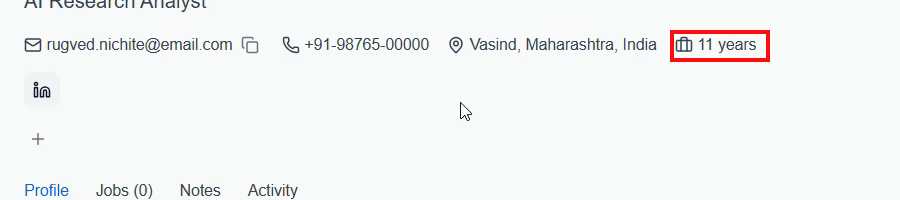
Observed output: Output artifact (Image): Profile header displayed Rugved Nichite's identity and contact details, with the AI Research Analyst title shown in the header. — p1_11years.png
Input artifact: Input artifact (Text prompt): Input
Output artifact: Output artifact (Image): Profile header displayed Rugved Nichite's identity and contact details, with the AI Research Analyst title shown in the header. — p1_11years.png
What changed: Text prompt transformed into Image
Test case: Text prompt → Image
Input type: Text prompt
Input used: Input artifact (Text prompt): Input
Observed output: Output artifact (Image): Profile header displayed Priya Sharma's identity, contact details, location, and current title. — p4_2years.png
Input artifact: Input artifact (Text prompt): Input
Output artifact: Output artifact (Image): Profile header displayed Priya Sharma's identity, contact details, location, and current title. — p4_2years.png
What changed: Text prompt transformed into Image
Test case: Text prompt → Text prompt
Input type: Text prompt
Input used: Input artifact (Text prompt): Input
Observed output: Output artifact (Text prompt): Output
Input artifact: Input artifact (Text prompt): Input
Output artifact: Output artifact (Text prompt): Output
What changed: Text prompt transformed into Text prompt
Why it matters / Conclusion: Strong at filling the basic candidate header, but the header also carries an unreliable experience badge.
Creates a top-of-profile candidate card from an uploaded resume, surfacing core header fields like name, email, phone, location, and current title. The evidence here comes from the profile-header card itself.

Total experience calculationThe experience badge was inconsistent and often wrong.▾
Feature tested: Total experience calculation
Result: Failed
Verdict: The experience badge was inconsistent and often wrong.
Expected behavior: Infers the candidate's total years of experience from the resume and displays it as a header badge. The evidence here is the experience-year output tested on resume inputs.
Test case: Text prompt → Image
Input type: Text prompt
Input used: Input artifact (Text prompt): Input
Observed output: Output artifact (Image): The header showed 11 years, but the report says Rugved actually has about 2–3 years of experience, so the total was inflated. — p1_11years.png
Input artifact: Input artifact (Text prompt): Input
Output artifact: Output artifact (Image): The header showed 11 years, but the report says Rugved actually has about 2–3 years of experience, so the total was inflated. — p1_11years.png
What changed: Text prompt transformed into Image
Test case: Text prompt → Image
Input type: Text prompt
Input used: Input artifact (Text prompt): Input
Observed output: Output artifact (Image): The header showed 2 years, but the report says Priya actually has about 6.5 years of experience, so the total was undercounted. — p4_2years.png
Input artifact: Input artifact (Text prompt): Input
Output artifact: Output artifact (Image): The header showed 2 years, but the report says Priya actually has about 6.5 years of experience, so the total was undercounted. — p4_2years.png
What changed: Text prompt transformed into Image
Test case: Text prompt → Text prompt
Input type: Text prompt
Input used: Input artifact (Text prompt): Input
Observed output: Output artifact (Text prompt): Output
Input artifact: Input artifact (Text prompt): Input
Output artifact: Output artifact (Text prompt): Output
What changed: Text prompt transformed into Text prompt
Why it matters / Conclusion: Useful when it gets the calculation right, but it was wrong on 2 of 3 resumes and appears to infer experience from the wrong date ranges.
Infers the candidate's total years of experience from the resume and displays it as a header badge. The evidence here is the experience-year output tested on resume inputs.
Work history parsingJob entries and descriptions were captured well, but date granularity can be hallucinated.▾
Feature tested: Work history parsing
Result: Partial
Verdict: Job entries and descriptions were captured well, but date granularity can be hallucinated.
Expected behavior: Extracts multiple job entries from the resume experience section and preserves role descriptions. The evidence includes resumes where job entries and descriptions were recovered from varied experience sections.
Test case: Text prompt → Text prompt
Input type: Text prompt
Input used: Input artifact (Text prompt): Input
Observed output: Output artifact (Text prompt): Output
Input artifact: Input artifact (Text prompt): Input
Output artifact: Output artifact (Text prompt): Output
What changed: Text prompt transformed into Text prompt
Test case: Text prompt → Text prompt
Input type: Text prompt
Input used: Input artifact (Text prompt): Input
Observed output: Output artifact (Text prompt): Output
Input artifact: Input artifact (Text prompt): Input
Output artifact: Output artifact (Text prompt): Output
What changed: Text prompt transformed into Text prompt
Test case: Text prompt → Image
Input type: Text prompt
Input used: Input artifact (Text prompt): Input
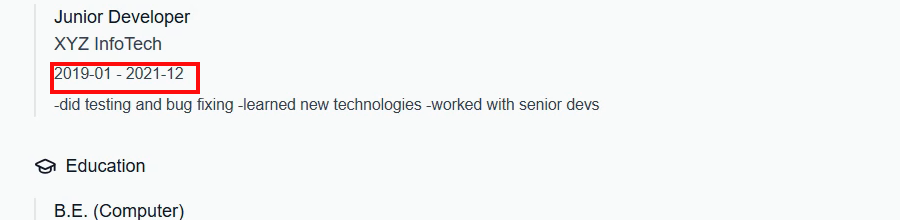
Observed output: Output artifact (Image): The Junior Developer entry was captured, but the tool hallucinated months and turned a year-only range into January 2019 to December 2021. — p7_month_hallucination.png
Input artifact: Input artifact (Text prompt): Input
Output artifact: Output artifact (Image): The Junior Developer entry was captured, but the tool hallucinated months and turned a year-only range into January 2019 to December 2021. — p7_month_hallucination.png
What changed: Text prompt transformed into Image
Why it matters / Conclusion: Good at finding jobs and keeping the descriptions, but it sometimes invents more precise dates than the source contains.
Extracts multiple job entries from the resume experience section and preserves role descriptions. The evidence includes resumes where job entries and descriptions were recovered from varied experience sections.
Education parsingDegree and institution extraction worked, but date inference and completeness were weak.▾
Feature tested: Education parsing
Result: Partial
Verdict: Degree and institution extraction worked, but date inference and completeness were weak.
Expected behavior: Extracts degree-level education entries, institutions, and date ranges from resumes. The evidence comes from resumes containing school and degree information.
Test case: Text prompt → Image
Input type: Text prompt
Input used: Input artifact (Text prompt): Input
Observed output: Output artifact (Image): The degree, university, and year were captured, but CGPA or percentage was omitted. — p2_cgpa_missing.png
Input artifact: Input artifact (Text prompt): Input
Output artifact: Output artifact (Image): The degree, university, and year were captured, but CGPA or percentage was omitted. — p2_cgpa_missing.png
What changed: Text prompt transformed into Image
Test case: Text prompt → Image
Input type: Text prompt
Input used: Input artifact (Text prompt): Input
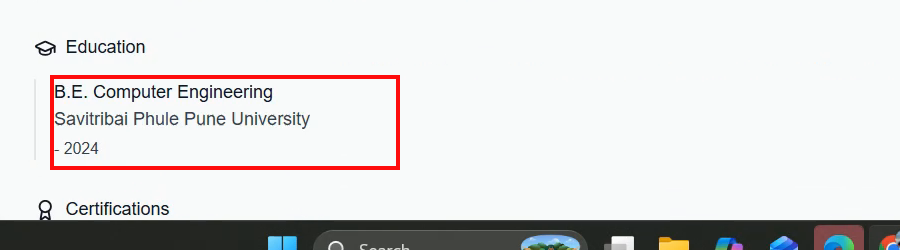
Observed output: Output artifact (Image): The education line showed a fabricated 2015–2019 range even though the source only gave a graduation year. — p5_edu_hallucination.png
Input artifact: Input artifact (Text prompt): Input
Output artifact: Output artifact (Image): The education line showed a fabricated 2015–2019 range even though the source only gave a graduation year. — p5_edu_hallucination.png
What changed: Text prompt transformed into Image
Test case: Text prompt → Image
Input type: Text prompt
Input used: Input artifact (Text prompt): Input
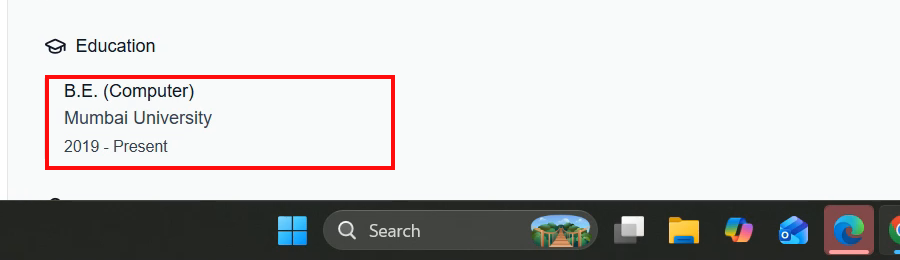
Observed output: Output artifact (Image): Only one education entry was returned, and the date line was shown as 2019–Present instead of a completed graduation year. — p9_only_one_education.png
Input artifact: Input artifact (Text prompt): Input
Output artifact: Output artifact (Image): Only one education entry was returned, and the date line was shown as 2019–Present instead of a completed graduation year. — p9_only_one_education.png
What changed: Text prompt transformed into Image
Why it matters / Conclusion: It consistently finds the degree and school, but grades are never returned and the date logic is unreliable.
Extracts degree-level education entries, institutions, and date ranges from resumes. The evidence comes from resumes containing school and degree information.

Certification parsingCertification names were captured, but issuer fields were inconsistent.▾
Feature tested: Certification parsing
Result: Partial
Verdict: Certification names were captured, but issuer fields were inconsistent.
Expected behavior: Extracts certifications as named entries, often with years and sometimes the issuing organization. The evidence is from resume inputs listing certificates and issuers.
Test case: Text prompt → Text prompt
Input type: Text prompt
Input used: Input artifact (Text prompt): Input
Observed output: Output artifact (Text prompt): Output
Input artifact: Input artifact (Text prompt): Input
Output artifact: Output artifact (Text prompt): Output
What changed: Text prompt transformed into Text prompt
Test case: Text prompt → Image
Input type: Text prompt
Input used: Input artifact (Text prompt): Input
Observed output: Output artifact (Image): The two certifications and years were listed, but the issuing organizations were missing. — p6_cert_orgs_missing.png
Input artifact: Input artifact (Text prompt): Input
Output artifact: Output artifact (Image): The two certifications and years were listed, but the issuing organizations were missing. — p6_cert_orgs_missing.png
What changed: Text prompt transformed into Image
Test case: Text prompt → Text prompt
Input type: Text prompt
Input used: Input artifact (Text prompt): Input
Observed output: Output artifact (Text prompt): Output
Input artifact: Input artifact (Text prompt): Input
Output artifact: Output artifact (Text prompt): Output
What changed: Text prompt transformed into Text prompt
Why it matters / Conclusion: Certification titles and years are usually captured, but issuer coverage is not consistent across resumes.
Extracts certifications as named entries, often with years and sometimes the issuing organization. The evidence is from resume inputs listing certificates and issuers.

Skills and language taggingOne of the most reliable parts of the parser.▾
Feature tested: Skills and language tagging
Result: Passed
Verdict: One of the most reliable parts of the parser.
Expected behavior: Turns resume skills into individual tags and detects listed languages. The evidence comes from resumes where skill terms and languages were converted into tags.
Test case: Text prompt → Text prompt
Input type: Text prompt
Input used: Input artifact (Text prompt): Input
Observed output: Output artifact (Text prompt): Output
Input artifact: Input artifact (Text prompt): Input
Output artifact: Output artifact (Text prompt): Output
What changed: Text prompt transformed into Text prompt
Test case: Text prompt → Text prompt
Input type: Text prompt
Input used: Input artifact (Text prompt): Input
Observed output: Output artifact (Text prompt): Output
Input artifact: Input artifact (Text prompt): Input
Output artifact: Output artifact (Text prompt): Output
What changed: Text prompt transformed into Text prompt
Test case: Text prompt → Text prompt
Input type: Text prompt
Input used: Input artifact (Text prompt): Input
Observed output: Output artifact (Text prompt): Output
Input artifact: Input artifact (Text prompt): Input
Output artifact: Output artifact (Text prompt): Output
What changed: Text prompt transformed into Text prompt
Why it matters / Conclusion: Skills and language tagging were consistently strong across all three resumes.
Turns resume skills into individual tags and detects listed languages. The evidence comes from resumes where skill terms and languages were converted into tags.
Banner Preview
How the embed badge will look on your site

Embed HTML
Copy this code to your website source
Quick Integration Guide
- 1Copy the HTML code block above.
- 2Paste it into your site's HTML or CMS editor.
- 3Banner appears instantly on your page.
- 4Links back to your tool profile here.
Similar Tools
Discover more AI tools like CVParserPro to enhance your workflow.
Comments (0)
Need a custom AI solution for this use case?
If you are looking to build a custom resume parsing, candidate profile extraction, or CV data extraction system for your business or internal workflow, email us at contact@futuresmart.ai.
Found something inaccurate or missing? We try to keep our AI research accurate and useful. If you found outdated information, an issue, or have a suggestion, email us at collaborate@aidemos.com.